Dual Boot – Truth is Stranger than Fiction

After a spectacularly unsuccessful day of trying to get my (working perfectly before this process started) notebook to dual boot Vista and Ubuntu, I went to look at the Ubuntu forums to see if anyone else had replied to my post. There was no new information since last night, so I decided to keep trying.

This morning I went into Ubuntu and deleted the swap drive at the end of the list of partitions using gparted. I also found out that the Home folder that Ubuntu sees belongs to the previous Ubuntu studio install as I did not have permission to save anything.

I wanted to take a photo of the giant ERROR message that I get when starting Vista so everyone on the Ubuntu forum could see that this is a really different problem. I had some helpful feedback, but some of it was relating to a different type of problem. One poster had asked for more details and I feel that I need all the help I can get.

I rebooted into Windows Vista (longhorn) but now it is installing.

There is a small window called “Windows Setup”
———————————

Windows Setup
Windows is now installing the following items:
Install the application

——————————

Behind this small window is a listing of programs example:

C:\preload\touchpad>start /w C:\preload\patch\sleep.exe

Now Vista is starting up.

This is so odd.

I didn’t do anything except remove one swap drive.

I will now see how functional Vista is — and if I can still boot into a working Ubuntu.

————————————————————-

Truth is stranger than fiction.

————————————————————–

I still have the problem with the hard drive fragmentation and the Ubuntu studio kernal being on the drive and owning the home directory.

This is progress though – now where is my WEP key?.

———————————————————————————————————————————

After this post, I went back to see how Vista was installing and saw this screen.

Ubuntu works

Ubuntu booted?

Possible explanation: Vista restarted to install and the bootloader defaults to Ubuntu.

Check it out – it seems to still be working despite all of the Vista activity.

Back to a reboot and I chose the first listing of Vista – that is where all the installing was happening before.

Vista Error

The giant ERROR screen

Possible explanation: This is some type of back-up archive and something happened before that is not happening now.

How technical can you get? I mean that some event was triggered to initiate the recovery when I deleted the one swap partition (maybe) and once the recovery was completed — I am back to the error screen. But will this happen on the second listing because if this theory is correct, then the restore would have been installed to the second Vista partition.

Reboot – I am getting really good at loosening the battery just enough ….

The second listing of Vista (longhorn) booted into the Vista Welcome screen.
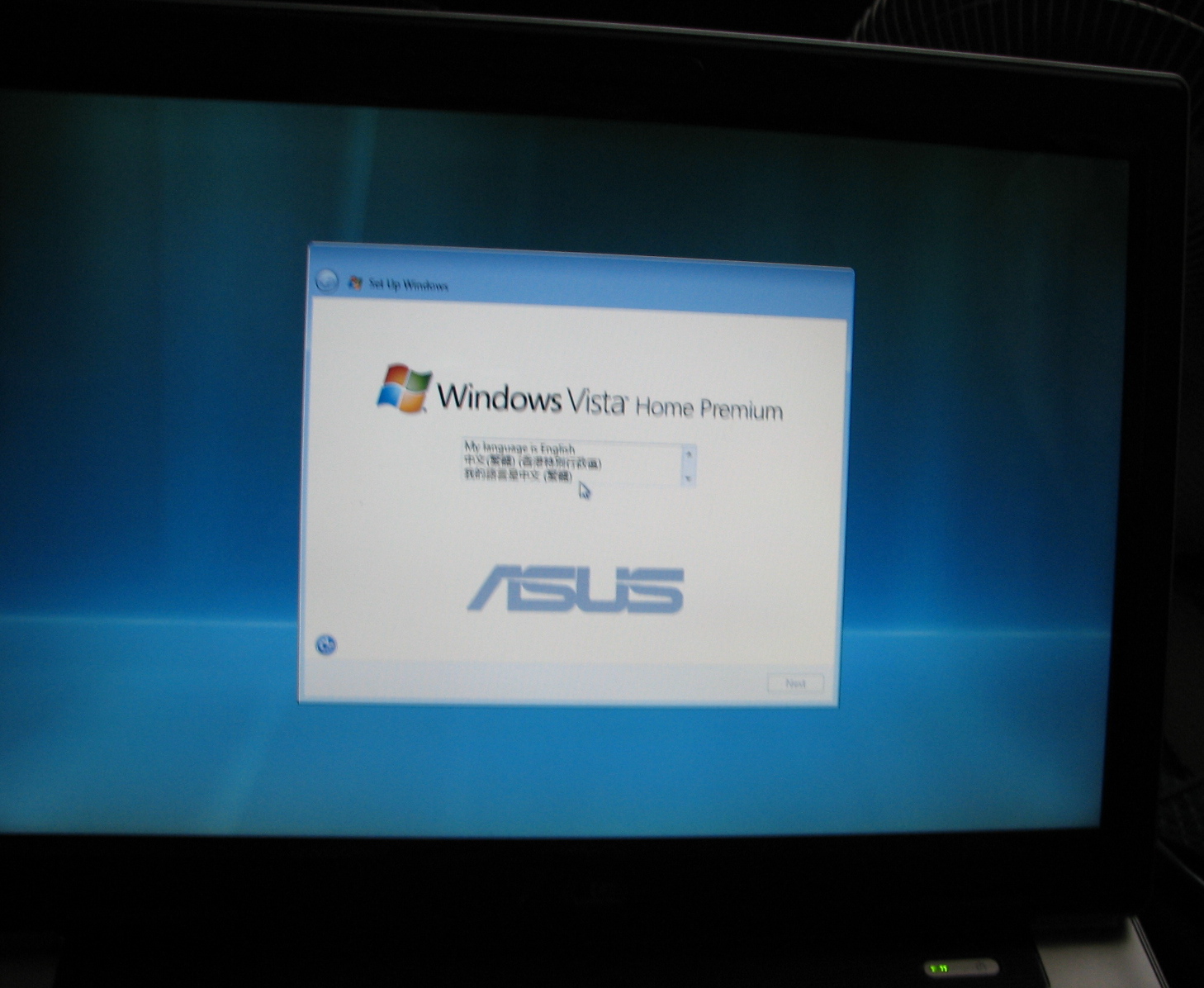
Vita works

Is Vista really working?

This is not the same boot-up that happened before. This one asks to set my language and password and makes me check the license agreement. (there is nothing on there against dual boot)

Now it seems that Vista will work.

I will be checking out the functionality now.

————————————————–

Strange but true, the computer repaired itself — so that now the grub loader will boot ubuntu (default) after a few seconds of wait to allow me to select the second choice of Vista (longhorn) Home Edition. The kernal 7.10 selection is the failed install of ubuntu studio that boots into kernal mode with no GUI.

Vista is happily installing updates from the internet.  It only sees it’s own harddrive partition used for the install and not any part of the Ubuntu partitions. Strangely enough, it doesn’t recognize the Fat32 partition that I think is used to back up and restore the system. Vista has enough space to operate and install programs and I plan to use an external drive for most data.

Ubuntu operates the Wifi card and seems happy on the system. I just have to figure out a way of removing the failed Ubuntu studio install (kernal 7.10) and assign the home drive to the Ubuntu that is working.  Then I can test out the built in camera and microphone and try to get some music and graphics programs installed.

Once I get this notebook running, it will be my primary mobile computer so I will need a firewire audio interface. Is there one that supports Vista, Ubuntu 7.10 and mac? I will find out soon.

Yamaha FJ – On the Road

Two sunny days in a row happened last weekend, so on Monday I bought insurance for the big bike — my Yamaha FJ1200. By Friday, I was riding confidently, under a partly cloudy sky, to Yaletown. I was scheduled to meet with a documentary film maker who wanted to interview me about one of my teachers and the benefits of her program.

After the interview, which was quite short, I thought I would join my daughter for dinner, so I phoned her as it started to rain. We made plans, but as I talked to her the rain turned to small beads of hail. I decided to have a coffee and wait this one out. The closest Starbucks was the only organic coffee in the area. Starbucks will go organic if you insist, they will make you a bodum press of organic coffee if they don’t have any on tap. As the hail was quite fierce, I lingered over the brew, but then it started to clear up a bit. I quickly saw my chance to head out, returned to my bike and shook the hail off the bike cover. The FJ started easily, even in the cold, but I knew the remnants of the hail was still on the street, so I was careful not to start or stop too quickly.

I started to head over to my daughter’s house, but decided to go home instead as it was really cold and I was worried about the weather. I had seen a couple of lightning strikes and the big, dark clouds now covered the sky. I was quite close to home when the hail started coming down again. My hands freezing as I drove very carefully on the slippery stuff, I managed to park outside my house and cover the bike quickly. The hail was coming down very thickly by then and I felt lucky to have made it home.

Later, I looked out the window and confirmed I had made the right choice.

9763-snowfjvan.jpg

In Vancouver, it usually snows enough to cover the ground a couple of times a year. This was taken Friday, April 18th, 2008. The spring flowers are out, the daffodils and tulips are blooming and the early cherry trees are already finished. It is so unusual that I know this unseasonable cold is a symptom of climate change. This cold and hail must be affecting the local farmers and gardeners. There are some people who think that the global warming can cause an ice age as the pendulum swings back to self-correct the climate. I am worried about the future, but I will do what I can in the present.

9765-snowfj.jpg

Ubuntu and Notebook II


The attempt to configure my Asus notebook to dual boot did not go as well as I hoped. Click here for details. However, I haven’t given up yet and I do have Ubuntu 7.10 working but my Vista boots to a huge ERROR screen. I am going to try to re-install Vista from the Asus restore disks, but I am afraid that it will wipe out the Grub boot loader that allows me to choose which system to boot. This is a photo of my desktop Ubuntu computer that is giving me all the help from the internet as I try to get everything to work.

9761_ubuntudesktop.JPG

I think I had more trouble because I tried to install Ubuntu Studio. After a lot of different error messages, I got this screen, but no matter what user name and password I entered, I could get no further. Now my Vista refused to boot and I saw the giant error for the first time.

ubuntustudio

I tried the Ubuntu studio install again, but the next time it would only boot to the kernel and that it where it sits now. I couldn’t get Vista to run, so I reinstalled from my Asus restore disks. Now Vista was working again, but all my files are lost – nothing to be too sad about as I was trying not to use the computer until this process is complete …

Next I tried to install the regular distro that I have on the desktop. This is a photo of the Ubuntu install of the regular Gutsy Gibbon distro. It worked completely and is now on my notebook.

ubuntu inprogress

Now, I have some real problems as I have a working Ubuntu 7.10 with the following partitions and subdivisions The Vista partition is there and seems to have all the files in there that it needs to operate. The really bad thing is all the fragmentation due to two linux kernels being installed, two swap partitions and some unallocated space. When I looked at it in gparted I did not know what to do!
gparted screenshot

Here is the same HD from the working Ubuntu Places>computer.

places-browserapril19-sm.jpg
Vista is marked as installed, but somehow the Grub boot loader is not initiating the Vista boot sequence. I looked in the files and they all seem to be there. Now I have to find out how to fix these problems.

At least now I know I can use Ubuntu on this notebook, even the WiFi works. It seems to be a choice of one or the other right now as if I reinstall Vista, then I can’t boot to Linux and with the working Ubuntu, Vista is not working.

Off to Ubuntu forums to see if I can get some help.

WordPress Upgrade

Bluehost has a new system of WordPress install called Simple Scripts. I have heard this makes it easier to upgrade the install and it is simpler to manage than the current Fantastico install. So now, I have to back up my blog, delete it from the server, reinstall Word Press with Simple Scripts and restore my data.

This is a bit of work, but the new release of WordPress is supposed to be better at handling widgets and plug-ins. The second reason I am reinstalling is to move the blog off the root directory. I originally installed Word Press on the root directory to make sure it would work. I now want to have a more organized site with permanent pages and a link to the blog.

I am finding that people who are not familiar with blogs do not go to my static pages, which contain the background and general information about the project. I moved them to the top left in the hope they would be more appealing, but often they are ignored. Instead readers become confused by reading the posts only and sometimes are not getting the idea of the entire project at all.

I will have to whip something up to act as a repository for the static pages and link to the blog to avoid this problem. Those of you who have looked at my pages know I like colour and design and I have tried in a limited way to colour code WP pages. A new site splash page and static information pages will take some time to design, but I think the result will be worth it.

So far, my efforts have not inspired any funding, so I am having to work at my day job for more hours than I originally planned. Maybe an improved web presence will help me with funding, as I think the scope of the project is not clearly laid out in the blog, especially if the static pages are not viewed.

Ubuntu and Notebook Computer

The tour is getting closer and the book is taking up a lot of time. I have to post an update because I realize I have been slow to enter information. When I am streaming real time it will be immediate, but the webcam I bought will not work in Ubuntu so far.

To take on the tour I bought an ASUS notebook and I am downloading the Ubuntustudio Gutsy distro to load on to it. It will be a dual-boot with the absolutely legit copy of Vista that came installed on it. I managed to crash Vista three times installing firefox, anti-virus and a firewall. Thank you Microsoft. I now own legitimate copies of Microsoft software stretching back from DOS (1998), Windows, Windows 95, Windows 2000, two copies of XP and now vista. I also owned Apple Basic, OS9 and OSX 3.9. No wonder I am getting into Open Source. I am tired of continually having to buy new operating systems!

ASUS photo 3

The ASUSTek A8M_A8T Series Notebook came with a built in webcam and mic so streaming should be easy — if I can get Ubuntu to recognize the hardware. It is a dual-core AMD Turion 64×2 TL-52 803 MHz mobile technology chip (AMD K8 Processor), 32 bit operating system, ACPI mother board, NVIDIA GeForce Go 6100, 120 gig HD, bluetooth, SD card reader and DVD burner. It is not the most blazing fast computer, but with the fan it runs really cool and it has connectivity with 4 USB, mini firewire (will need a special converter jack), S-video out and a jack I don’t know what it is for yet. Although I believe I can run the 32 bit distro, I read some forums and found that some people have more problems with it. I haven’t decided yet if I am going to go that route. More research is needed, maybe I will post on the Ubuntu forum.

ASUS notebook1

The notebook is originally from Korea and so has all the characters still on the keyboard. My friend Allen is Korean, so even though the drive was wiped, I will probably be able to get him to type something in Korean for me. Even though this notebook is two years old there is still one year left on the warrantee — I did my research ASUS makes good computers. I have owned several of their mother boards and my current XP and retiring Win 2000 computers both run very well with Intel chips. The AMD 1.5 GHz desktop I used for a few months before passing on to my oldest son, is standing up well under his neglect, although I do still service it.

The thoughtful Korean fellow motorcyclist I purchased it from had already partitioned the drive, so I plan to put Ubuntu on the 2nd partition. The Vista partition uses 21.6 GB for the operating system and 3 internet utilities. No documents, no programs just a very large OS. I have a copy of DOS OS for the very first IBM notebook I [still] own — it is on a single-sided low density floppy disk. I think they can do better, so I will compare how much space the Ubuntu distro takes. The shot below is trying to show the HD space used, but I had to use a flash to get a reasonable photo and it is hard to see.

Showing VISTA memory useI had to do some work on my Gutsy desktop today because I wanted to take some screen shots. It is not that easy in Ubuntu, no Grab in utilities (Mac) no shift-prtscrn key (Win). I am downloading a Gnome plug-in called “Go” .

I hope this will allow me to capture some of the song score from the .pdf file I am working on. I may just use the mac at the studio to Grab the score right from Finale, the notation program I am using to produce the score. I am trying to do this whole blog in Ubuntu, but it is a challenge. I am learning a lot though and hope that I will be able to do all of the graphic and book design in Unbuntu using The Gimp and Scribus. The multi-media part will involve the Mac G4 Powerbook as Finale and the audio tools I use are Mac OS. However, I hope this Ubuntustudio version is more supportive of my needs and by the time I am on tour I can erase the Vista from my drive.

Environmentally Friendly Book Production

The “Live More Lightly Songbook”  is in the production stage now and I am researching environmentally friendly book production methods. The Association of Book Publishers of BC (ABPBC) has already done a lot of the work for me and has produced an EcoKit that you can download from here.

 EcoKit logo

They also recommend visiting Markets Initiative  to find out more about ancient forest friendly paper. I am so happy when I see industries making the move towards reducing the impact that humanity has upon the planet.

——————————————————————————————-

I also intend to minimize the amount of material I use by making the book as small as possible and including the rest of the content on CD. Updates, additional arrangements and other extras may be downloadable from the website. I would like to compile a library of song performances, so that every participant can feel the support of all of the other singers.

Live More Lightly Support

I have created a new page to record all support and funding that the Live More Lightly Project receives. I also want people who may be reading these pages to know that I am working hard to make this project a reality.

I have applied to several arts funding programs and have recently received notification of a few more that I can try. So far I have not been successful in obtaining funding, but it has been really encouraging to be considered for project support by the Second Inclusiva-net Meeting: Digital Networks and Physical Space. The project development would have occurred in Madrid, Spain, which was a bit daunting as I do not speak Spanish. I planned to collaborate with European artists using internet translation similar to the service provided when the flags on the top left of my blog are selected.


The Live More Lightly Project has already opened horizons for me as I investigate the work of other artists internationally. I am still hopeful that I will obtain support to produce the project the way I envision. Even if I have to scale back due to self-funding constraints, I will still do my best to realize the spirit of the project.

The idea is to change lifestyles in the developed world one action at a time. We are each capable of doing some small effort that can add up to a big difference.

I am using the ancient methods of the musical troubadour combined with all of the most powerful modern technologies of the internet to deliver the message “We can live more lightly upon the land”. I believe this is an important message and I hope that some of these funding and sponsorship coordinators will think so too.

Streaming from a Motorcycle Outline


Sketch of Bike cam logo idea by Victoria

Streaming Video From a Motorcycle

Required Equipment

Category

Equipment

1.


Image Capture Device

  • camera

  • lense and recorder (helmetcam or isight)

2.


Notebook Computer

  • Macintosh Powerbook

  • Ubuntu Powerbook

Choice of OS may lead to using two notebook computers

Backup always good, but space limited.

3.


Satellite Modem

  • many choices

  • data calls expensive

  • Sponsorship an option

4.


Monitor Device

  • cell phone monitor stream

  • small LCD screen

5.


Voice Communications

Satellite cell phone with Bluetooth headset and networking

6.


Video Switching device

Handlebar mounted video switching device to stream camera1 or 2

7.

Streaming Server

Many options including free services


First Ubuntu Post

My Ubuntu internet computer is now operational and I am exploring the unique personality it has. I am considering using a Ubuntu or other Linux OS for the notebook computer(s) I will use on the Live More Lightly Tour.

There are three reasons that I would like to try this:

  1. Cost: I wanted to buy a Mac G4 dual core Powerbook to replace the single core I recently sold, but it seems that the model I need will cost approx. $3500. I could put a Ubuntu OS on a dual core platform for much less. I would also like to put my limited resources behind Open Source software because I have spent all of my money on computers and music technology for decades. When I bought my Powerbook, it took all the money I had. Then I had to go and work to buy the software. I did not get as much use out of my notebook as I might have because I had to have paying work to buy the tools I needed. If I start spending my money on Open Source I can expect that next time the tools will cost less — not more. Another issue is the cost of constantly updating software as I update my hardware. I still have my Windows 2000 computer because it has Corel Draw and several other programs I bought for that computer that would not run on XP. Now, with Ubuntu, I will try Open Office drawing programs and if I am able to meet my requirements, then I won’t have to worry about buying the upgrade all of the time.
  2. Green Power: I think that open source is inherently less energy consuming. I am going to have to research this point, but it seems that the corporate system of OS and software production is so huge and profit oriented that a community based alternative must be better. As they say in Wikipedia … citation needed.
  3. Community: The Ubuntu Community may be willing to assist me in my desire to move the internet down the highway streaming from a motorcycle (at perfectly legal speeds, of course). I am trying to open a dialog with Apple as well. I really did love my old G4 Powerbook, but it was very costly to be a part of that community and my object is to produce Art not impress with a fashion statement. Aesthetics are a part of the artistic process, but in my case, the “look” of my computer is not the most important thing.

Continue reading

Song for International Women's Day

This is a video of a song written by Victoria Gibson in honour of International Women’s Day. Performed by Victoria and the Seaquam Secondary School Choir for the Society of Women in Science and Technology Conference in 2000 held at the school.

I have performed this song almost every year since I wrote it in 1994. The song was written to include the audience in affirming and celebrating International Women’s Day by giving them the line “Way-way-oh-way-oh” to sing or chant. I chose these syllables because my teenagers were arguing and one was insisting “Way”, while the other stated definitely “No way”. This sparked the idea in my mind that “way” could be a synonym for agreement and also indicate a positive direction, path or way.

This is a Quicktime link
Link to Women’s Day Song

Link to Womens Day Song Information and Lyrics

————————————————————————–

Victoria will be performing the Womens Day Song

live in Bellingham on March 8th, 2008

[WA] Whatcom County Intl. Women's Day Celebration -
The Bellingham
Intl. Women's Day Celebration in Bellingham
 with Farmworkers
Whatcom County Women's International Day Celebration****

TIME: 4:00 PM

LOCATIONS: Bellingham, Washington

Maritime heritage Park (500 Block of West Holly Street), the rally will kick

off with a performance by the Raging Grannies and a short talk by Andreia

Borges Ferreira of the Brazil Landless Workers Movement. At 4:30pm we will

be marching downtown Bellingham and ending up at the DreamSpace

(1318 Bay Street) for an evening celebration of dancing, divas, and

desserts!

Focus: Rural Women confronting globalization fight for food sovereignty!

Check out Womens Day events near you on this site:

Womens Day Site

logo41.gif